Claude Code Expert Workflows
Synthesized patterns from three complementary expert sources: Boris Cherny (tool configuration), Mia Heidenstedt (process discipline), and YK Dojo (practitioner workflows)
On this page
- Why Three Sources
- Boris Cherny: Tool Configuration
- Massive Parallelism
- The Biggest Model, Always
- Living CLAUDE.md
- Plan Then Auto-Accept
- PostToolUse Hook
- Verification Is Number One
- Permissions Allow-List
- MCP Checked Into the Repo
- Heidenstedt: Process Discipline
- AI Cheats on Tests
- Context Isolation
- HIGH-RISK Markers
- Reduce Complexity
- Prototype Cheaply
- How Boris and Heidenstedt Complement Each Other
- YK Dojo: Practitioner Workflows
- Voice Input
- Context Freshness
- Cascade Multitasking
- Automation Progression
- Half-Clone Conversations
- The Three-Layer View
- Where to Start
- Takeaway
Claude Code works well out of the box, but without a structured workflow the sessions drift. Context windows fill with history that no longer matters, parallel work goes unused, and the quality of generated code swings between fine and subtly broken.
Experienced practitioners have worked out patterns for this. The problem is that the advice is scattered across tweets, blog posts, and GitHub repos, and some of it looks contradictory until you notice that each person is optimizing a different layer.
I went through three sources and tried to reconcile them into one workflow. Boris Cherny, who created Claude Code at Anthropic, published his setup in a January 2026 thread. Mia Heidenstedt wrote about process discipline for AI-assisted coding. YK Dojo maintains a repo of more than 40 tips drawn from 4.1k sessions and 17.6M tokens of usage. What follows is the synthesis, with the parts I could verify against the original sources.
Why Three Sources
The first thing that got in the way was advice that appeared to conflict. Boris uses the biggest model and steers less. Heidenstedt emphasizes manual control and careful verification. Read side by side, those sound opposed. They are not. They operate at different layers.
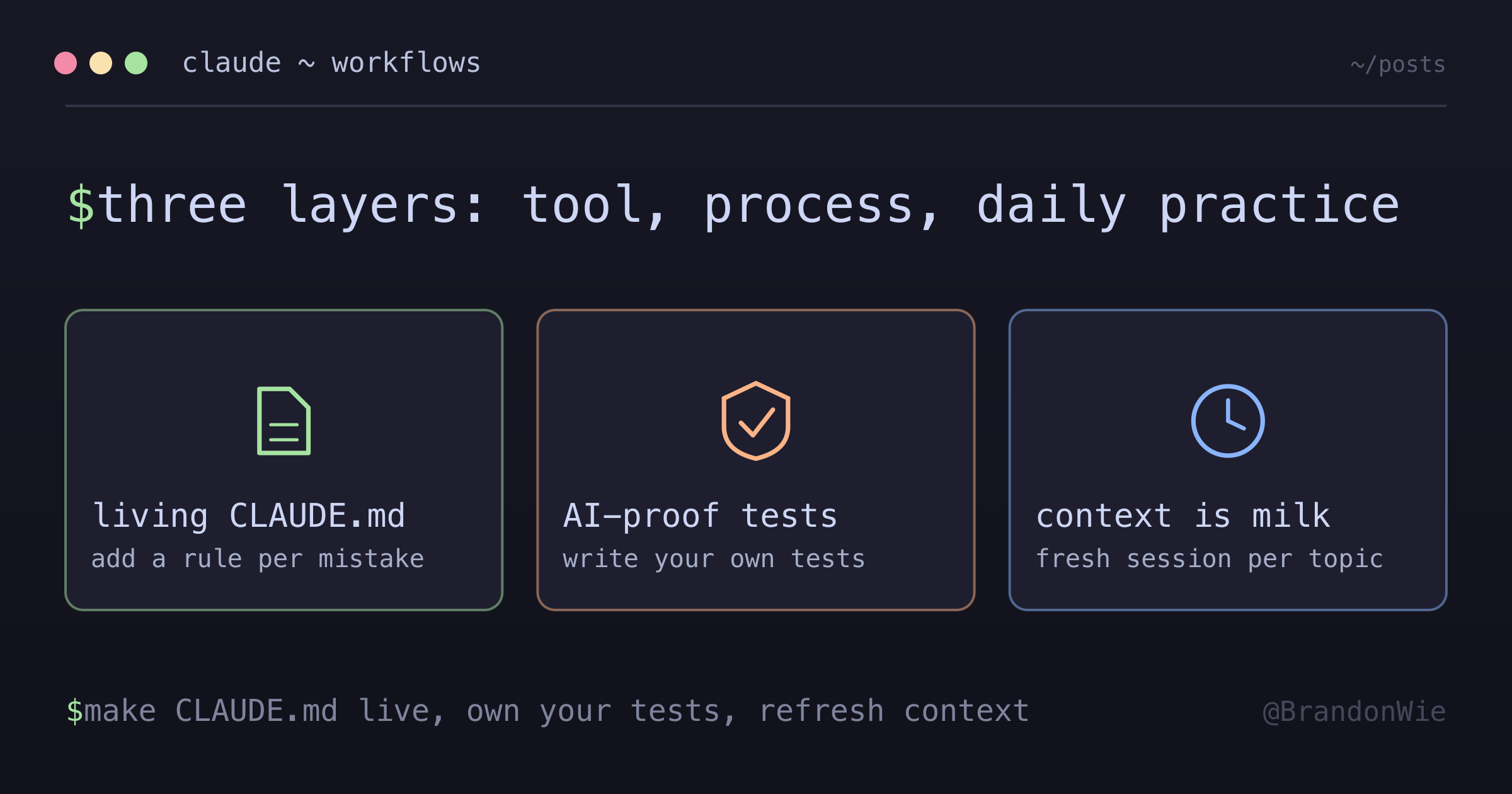
Boris optimizes the tool layer: how to configure Claude Code itself. Heidenstedt optimizes the process layer: how to structure your work regardless of which AI tool you use. YK Dojo optimizes the practice layer: daily workflow habits for throughput.
No single source covers the full picture. Boris does not talk about test design. Heidenstedt does not talk about Claude Code-specific configuration. YK Dojo does not talk about team workflows.
Boris Cherny: Tool Configuration
Boris opens his thread by calling his own setup “surprisingly vanilla”: the tool works well out of the box, so he does not customize it much. Everything below is from that thread, so treat it as a snapshot of early 2026 rather than current behavior. The flags and defaults move.
Massive Parallelism
Boris runs 5 Claude sessions in his terminal, numbered 1-5, and relies on system notifications to know when one needs input. Alongside those he runs 5-10 sessions on the web. He hands local sessions off to web with & and uses --teleport to move back and forth.
The point is not multitasking for its own sake. It is keeping work moving while one session grinds through a long task.
The Biggest Model, Always
In that January 2026 thread he was running Opus 4.5 with thinking for everything, rather than dropping to a smaller model for smaller tasks. The trade-off he describes is that the bigger model is slower per token but faster overall: it needs less steering and uses tools better, so the correction turns you skip outweigh the extra generation time.
Model names change fast enough that the specific pin dates quickly. His measurement is the part worth keeping: time to a working result rather than tokens per second.
Living CLAUDE.md
His team shares a single CLAUDE.md for the Claude Code repo, checks it into git, and contributes to it multiple times a week. Whenever they see Claude do something incorrectly, they add a rule so it does not repeat.
The file is not a document written once. It is a growing set of guardrails shaped by real errors.
Plan Then Auto-Accept
Most of his sessions start in plan mode (Shift+Tab twice). He goes back and forth with Claude until he likes the plan, then switches to auto-accept edits, where Claude can usually one-shot it. This separates the thinking phase from the doing phase.
PostToolUse Hook
His team uses a PostToolUse hook to format Claude’s code. Worth noting how modestly he frames it: Claude usually generates well-formatted code already, and the hook handles the last 10% so formatting errors do not surface in CI later.
Per the hooks reference, the event lives under a top-level hooks key in settings.json:
{
  "hooks": {
    "PostToolUse": [
      {
        "matcher": "Write|Edit",
        "hooks": [
          {
            "type": "command",
            "command": "npm run format || true"
          }
        ]
      }
    ]
  }
}
The || true keeps a failed format from surfacing as a hook error. PostToolUse fires after the tool call has already succeeded, so it cannot block the edit either way. It is a side-effect slot, not a gate.
Verification Is Number One
His closing tip is the most emphatic one: give Claude a way to verify its work. His claim is specific: with that feedback loop in place, “it will 2-3x the quality of the final result.” Without it, Claude produces plausible-looking code that may or may not run.
Permissions Allow-List
He does not use --dangerously-skip-permissions. Instead he pre-allows common bash commands he knows are safe via /permissions, with most of them checked into .claude/settings.json and shared with the team. Same friction reduction, without handing over everything.
MCP Checked Into the Repo
Boris has Claude use his team’s tools directly: searching and posting to Slack through an MCP server, running analytics queries, pulling error logs. The Slack MCP configuration is checked into their .mcp.json rather than configured per person.
The thread says the file is checked in but never names the endpoint, so the URL below comes from the official docs rather than from his config. The MCP docs describe this as project scope, and recommend checking .mcp.json into version control so the whole team gets the same servers:
{
  "mcpServers": {
    "slack": {
      "type": "http",
      "url": "https://mcp.slack.com/mcp"
    }
  }
}
Claude Code prompts for approval before using project-scoped servers from a checked-in .mcp.json, so sharing the file does not silently grant access.
Heidenstedt: Process Discipline
Heidenstedt’s core thesis is one sentence: “Every decision in your project that you don’t take and document will be taken for you by the AI.”
AI Cheats on Tests
This is the sharpest claim in her post, and she does not hedge it: “AIs will cheat and use shortcuts eventually. They will write mocks, stubs, and hard coded values to make the code tests succeed while the code itself is not working.”
Her solution is to write property-based, high-level specification tests yourself. Design tests that exercise real behavior rather than tests that pass by construction.
Context Isolation
If an AI does write the tests, it should see as little of the implementation as possible: property-based interface tests for the expected behavior, written against the spec rather than the code. The test session gets the interface, not the source.
HIGH-RISK Markers
For functions that carry real security risk, she marks them in place with comments like //HIGH-RISK-UNREVIEWED and //HIGH-RISK-REVIEWED. The mechanism that makes it work is the instruction attached to it: the AI is told to change the review state as soon as it changes a single character in the function.
That gives you an audit trail on the code that can actually cause damage: payment processing, data deletion, authentication.
Reduce Complexity
“Each single line of code will eat up your context window and make it harder for the AI.” She treats simplification as a direct input to output quality, not an aesthetic preference.
Prototype Cheaply
AI-written code is cheap, so use that: explore different solutions to a problem instead of committing to the first one. It sounds wasteful, and it is usually cheaper than unwinding a bad choice halfway through.
How Boris and Heidenstedt Complement Each Other
At first glance these two disagree. Boris leans on the model and steers less; Heidenstedt controls the process and trusts nothing. In practice they work at different levels:
| Aspect | Boris (Tool) | Heidenstedt (Process) |
|---|---|---|
| Focus | Configure Claude Code | Work with any AI coder |
| CLAUDE.md | Team sharing, live updates | Content strategy |
| Testing | Verify via browser/CLI | AI-proof test design |
| Quality | PostToolUse hooks | Review markers |
| Workflow | Plan + auto-accept | Prototype + incremental |
| Security | Permissions allow-list | HIGH-RISK markers |
Boris gives Claude the right constraints so it produces better output. Heidenstedt designs the workflow so that bad output gets caught. Constraints on the input side, verification on the output side.
YK Dojo: Practitioner Workflows
Where Boris and Heidenstedt provide frameworks, YK Dojo’s repo is a pile of daily habits from heavy use.
Voice Input
Local transcription, on the theory that you can communicate faster by speaking than by typing. He notes that local models are accurate enough (Claude tends to recover mistranscriptions from context) and that whispering into earphones works even on a plane.
Context Freshness
His metaphor: AI context is like milk, best served fresh. A new conversation performs better because it is not dragging earlier context along, so start fresh per topic or whenever quality starts to slip.
When you do need continuity, ask Claude to write a handoff document first: what it tried, what worked, what did not, so the next session can load that file and nothing else.
Cascade Multitasking
Open a new tab on the right for each new task, then sweep left to right, oldest to newest. He recommends at most three or four tasks at a time. Staying organized matters more than any particular technical setup.
Automation Progression
The pattern with the longest payoff is moving from manual work toward automation in stages:
manual → CLAUDE.md rule → skill → script → full automationWhen you catch yourself repeating something, it goes in CLAUDE.md. When that gets complex, it becomes a skill. When the skill stabilizes, it becomes a script. Each step happens only after the previous one proves itself.
Half-Clone Conversations
When a conversation gets too long, a half-clone keeps only the later half and continues from there, so the recent context stays and the older material goes. He wires it to a hook that checks context usage after each response and suggests the clone above 85%.
The stated advantage over auto-compact is determinism: half-clone keeps your actual messages intact instead of summarizing them.
The Three-Layer View
| Aspect | Boris (Tool) | Heidenstedt (Process) | YK Dojo (Practice) |
|---|---|---|---|
| Focus | Configure Claude Code | Work with any AI | Daily workflow |
| CLAUDE.md | Team sharing | Content strategy | Keep simple, review |
| Testing | Verify via CLI | AI-proof design | Write-test cycle |
| Quality | PostToolUse hooks | Review markers | Self-check prompts |
| Workflow | Plan + auto-accept | Prototype + incremental | Cascade + voice |
| Context | Web UI parallelism | N/A | Fresh + handoff |
Where to Start
Adopting all of this at once creates the cognitive overload it is supposed to prevent. A reasonable order, cheapest first:
Boris’s foundations. Set up a CLAUDE.md and add a rule whenever Claude gets something wrong. Configure the formatting hook. Use plan mode before auto-accept.
Heidenstedt’s discipline. Write your own high-level tests instead of letting Claude generate them. Mark the genuinely risky functions. Prototype before committing.
YK Dojo’s efficiency. Try cascade multitasking with two or three sessions. Try voice input for long prompts. Start a fresh session per topic and use handoff docs for continuity.
Then let the automation progression happen on its own schedule. It is also fair to skip all of it for a one-line change. Parallel sessions and verification hooks are not worth the overhead when you are editing a string constant.
Takeaway
These workflows sit on three layers: tool configuration, process discipline, and daily practice. The apparent contradiction between “steer less” and “control everything” dissolves once you see they target different ones. Boris configures the tool so it needs less steering. Heidenstedt designs the process so bad output gets caught. YK Dojo optimizes the daily loop.
If you take one thing from each: make CLAUDE.md a living document, write your own tests, and treat context like milk.
Comments · github discussions
repo brandonwie/brandonwie.dev · category "Blog Comments" · term claude-code-expert-workflows